Win business
CRM & lead routing
One Client File per person
Every client, deal and connected party, linked together.
Most CRMs keep leads, clients, transactions and vendors in separate places. In VybeOS they all connect, so the lender, title officer and other agent on a deal are one click from the client. No more digging for who is who.
- One 7-stage pipeline for every side: buyer, seller, tenant, landlord and referral.
- The Client File puts messages, notes, activity and deals on one screen, with an AI summary of where things stand.
- 6 lead-routing modes and eligibility rules, so leads only go to agents who are working.
- Lead source lives on each deal, so you can see where business comes from.
- Couples and families stay individual contacts and get one email or one group text.
- Buying 825 Sun DrUnder contract · closes Fri
- Selling 412 Oak LnActive · 6 showings

- Sarah KimLender · New American Funding
- Fidelity TitleTitle · escrow officer
- Mark DiazOther agent · listing side
- Lone Star InspectionsInspector
Lead routing
How a new lead finds the right agent.
Your rules decide who gets each lead, and the log shows why it went where it did.
A lead arrives
From your website, a portal, an ad or a Campaign Link. The AI sales agent replies in seconds while the lead is routed.
Matched to a Client File
Duplicates join the existing Client File, so a past client goes back to the agent who knows them.
Your rules apply
Rules written as plain sentences decide who is eligible by area, price, source and property type, with caps on how many each agent takes.
Assigned
Round robin, weighted, first to claim or a shared pond. A simulator tests your rules before they go live.
Rerouted if unclaimed
If the agent doesn’t claim the lead in time, it moves to the next eligible agent automatically and the manager is alerted.
Logged
Every assignment is recorded with the reason, and a fairness chart shows how leads are spread across the team.
Messages & campaigns
Every conversation in one place, sent only as your rules allow.
Email, text and portal messages sit on the client's timeline next to the deal.
- Connect Microsoft 365 and Google inboxes. Agents send from their own address.
- Inbox sync keeps only mail to and from known clients and discards the rest.
- Agents can text from their own local number, with consent, quiet hours and STOP handled.
- Drip campaigns where every step is scored, and property alerts for saved searches.
- AI drafts the reply. It sends on its own only where your settings allow; everything else waits for approval.
- Emily Chen10:31a
Can we do one more walkthrough...
Buyer· In escrow - Jessica Miller9:12a
"Can we add the Lakewood ...
High intent· Lead · Buyer - Robert AlvarezYest
Re: Kestrel Ln showing feed...
Client· Seller - Priya Nair · NorthlineYest
Appraisal received — at valu...
Vendor· Lender
- Email · 10:24 AM
Hi Sarah! Quick question — the inspection mentioned the HVAC. Should we be worried, or is that normal for a 2011 build?
- Portal message · 10:26 AM
Also — I uploaded the insurance quotes to the portal like you asked. Two options in there.
- SMS · 10:28 AM
And David wants to do one more walkthrough with his dad this week if possible.
- SMS · 10:31 AM · Sent by you
Totally normal for the age — and we're already requesting a full HVAC service plus a credit. I'll set up the walkthrough; Thursday at 5:30 work?
Thursday at 5:30 PM is confirmed with the seller's agent. They let me know the A/C unit is new and still under warranty. They have an HVAC tech coming out this evening to look at the vents.
Campaigns
Drip campaigns that learn which steps get replies.
Every step gets a score that weights replies most. Write with AI drafts a campaign from the best-scoring steps in the agent's voice, and messages send on their own only where your settings allow.
- Start from Vybe templates, your brokerage library or campaigns your agents share.
- Consent, quiet hours and STOP handling apply to every send.
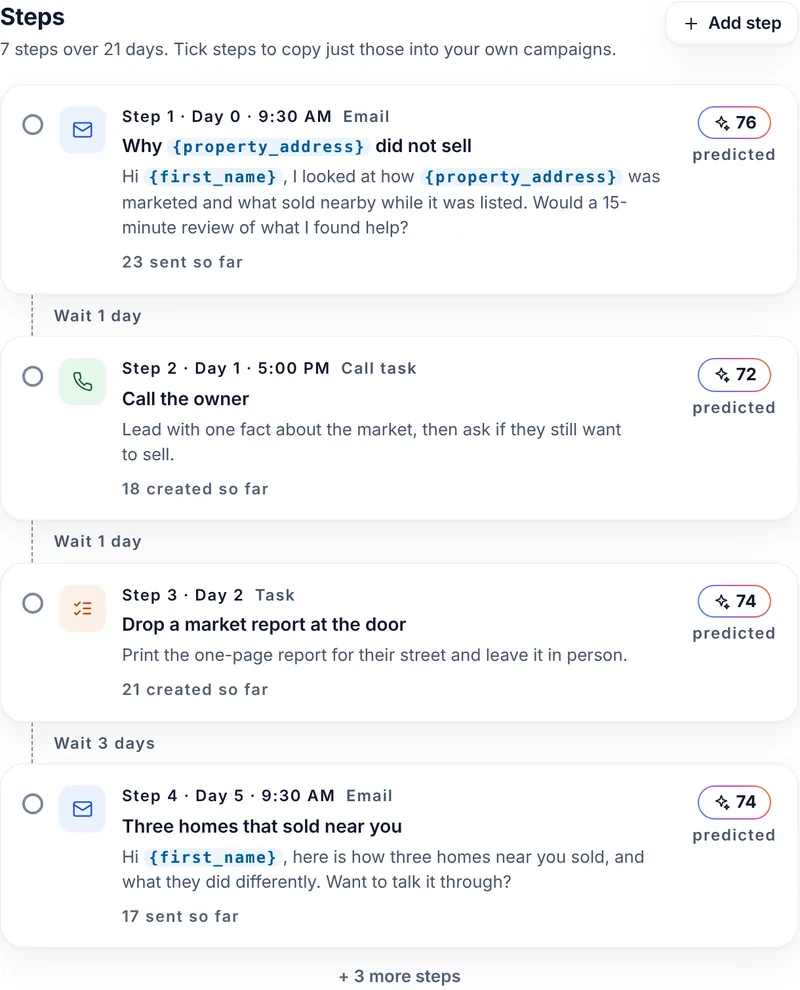
7 steps over 21 days. Tick steps to copy just those into your own campaigns.
- Step 1 · Day 0 · 9:30 AMEmailWhy
{property_address}did not sellHi
23 sent so far{first_name}, I looked at how{property_address}was marketed and what sold nearby while it was listed. Would a 15-minute review of what I found help?76predictedWait 1 day - Step 2 · Day 1 · 5:00 PMCall taskCall the owner
Lead with one fact about the market, then ask if they still want to sell.
18 created so far72predictedWait 1 day - Step 3 · Day 2TaskDrop a market report at the door
Print the one-page report for their street and leave it in person.
21 created so far74predictedWait 3 days - Step 4 · Day 5 · 9:30 AMEmailThree homes that sold near you
Hi
17 sent so far{first_name}, here is how three homes near you sold, and what they did differently. Want to talk it through?74predicted
+ 3 more steps
FAQ
Questions about the CRM.
Only as far as your settings allow. Each category can be Off, Draft for approval or Full auto, and an agent can never go past what their team or brokerage allows.
Every agent gets a local texting number. US carriers require each agent to register their own number (A2P 10DLC) before any text goes out, and VybeOS walks them through it. Consent records, quiet hours and STOP handling apply to every send.
Yes. Contacts, tags and notes import from your current CRM, and duplicates are merged into one Client File. What history comes across depends on what your current system can export.
Have another question? Ask us in a demo.
Platform sections
See a lead routed and worked.
We’ll route a new lead by your rules and follow it through the Client File, from the first reply to the deal.
Are you an agent? Send VybeOS to your broker or team leader